
Redact docs
Redact is a Solana trading terminal. The coins you buy sit in a shared pool, Solana Privacy Rings, instead of in your wallet, so a lookup of your wallet does not list them. Your trades are still public. Privacy Rings is a program by Helius; Redact is not affiliated with Helius.
- Hidden
- What you hold in the pool. A balance read of your wallet does not show it.
- Public
- Your wallet on every deposit, trade and withdrawal, and every amount in or out of the pool.
- Who can trade
- Every signed-in wallet can trade, with real SOL routed through Jupiter. Every trade from Pulse or a coin page runs through the pool with real SOL.
What Redact is
Redact is a trading terminal for Solana coins. Open the terminal and you are on Pulse, a live feed of new coins. Open a coin to see its chart and trade it.
Every buy and sell goes through Solana Privacy Rings, a shielded pool program by Helius on Solana mainnet, with routes from Jupiter. What you buy is held in the pool as private notes instead of in your wallet's token accounts, so a balance read of your wallet does not show it. Redact is not affiliated with Helius.
What the pool does not hide is the trading itself. The wallet that signs a trade, the swap and its size, and every amount going in or out of the pool are public. What is hidden and what is public lists it action by action.
- Pulse
- New coins as they launch, in three lanes, with filters and a quick buy key on every coin. Its Trending view ranks what is moving.
- The coin page
- One coin: its chart, price, liquidity, holders and pre-buy checks, beside the trade panel.
- Portfolio
- Your balance, what you hold, your results and your history. Trading wallets live in its Wallets tab.
- Privacy
- How much of your SOL is off your public page, the tools that move it, a check of any wallet and the pool totals.
Quick start
Five steps from a first visit to SOL back in your wallet. Each one says what becomes public.
- Sign in
Press Sign in and choose your Solana wallet. Then confirm one message in your wallet to show your balance. It cannot move funds.
No transaction - Deposit
Press Deposit in the top bar. It reads Deposit while your balance is zero. Pick an amount, then confirm in your wallet, which pays the network fee.
Wallet, amount - Buy
Open a coin from Pulse and press a buy key on its trade panel, or press the quick buy key on a coin in Pulse to open it with that amount ready. The coins go into the pool.
Wallet, swap, size - Sell
On the coin page, switch the panel to Sell and press a share key: 25, 50, 75 or 100 percent by default. The SOL goes back to your balance.
Wallet, swap, size - Withdraw
Open your balance from the top bar and press Withdraw. Send SOL to your own wallet or to any address you enter.
Wallet, receiver, amount
How it works
The pool hides what you hold. It does not hide your trading: your wallet signs every deposit, trade and withdrawal in public, and trade amounts are public. A trade takes four steps.
Coins and SOL held in the pool do not sit in your wallet's own token accounts. Anyone who looks up your wallet sees its SOL and its coins, and none of what you hold in the pool.
A buy is one transaction: SOL comes out of the pool, is swapped, and the coins go back in. If any part fails, none of it happens.
- Your wallet holds
- 3.00 SOL
- Deposit into the pool
- 2.00 SOLPublic
- Buy a coin from the pool
- 0.10 SOLPublic
- What you now hold in the pool
- Hidden
- A lookup of your wallet lists the coin
- No
- Withdraw to any wallet
- 0.50 SOLPublic
- Deposit
Move SOL from your wallet into the Privacy Rings pool.
Public - Trade
A buy takes SOL out of the pool, swaps it and puts the coins back, in one transaction your wallet signs.
Public - Hold
Your coins stay in the pool as private notes, not in your wallet’s token accounts, so your wallet’s balance does not show them.
Public - Withdraw
Take SOL or coins out to any wallet.
Public
| The Privacy Rings program | The program every deposit, trade and withdrawal goes through. View on Solscan |
|---|---|
| The pool's SOL | The account that holds the pool's SOL; its balance is the pool total. View on Solscan |
| The pool's coins | The authority over every coin vault of the pool. View on Solscan |
| Your own moves | Every deposit, trade and withdrawal is a public transaction. Each row of Portfolio's History and Transfers links to its own on Solscan. |
Balance, deposits and withdrawals
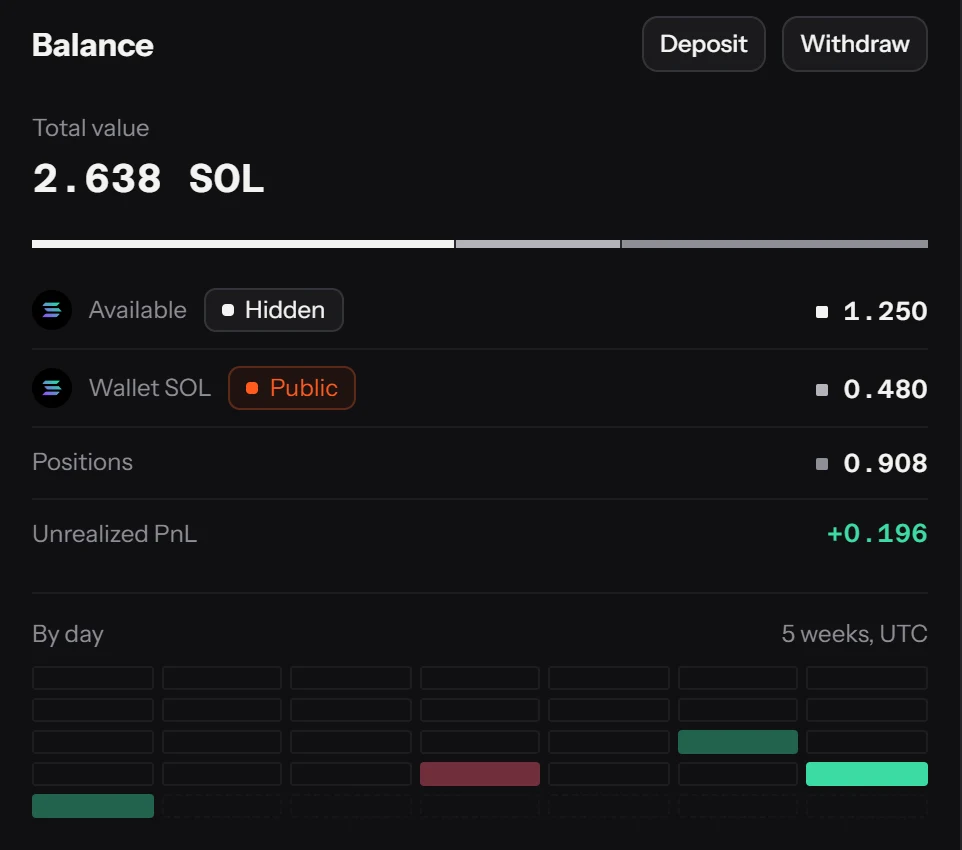
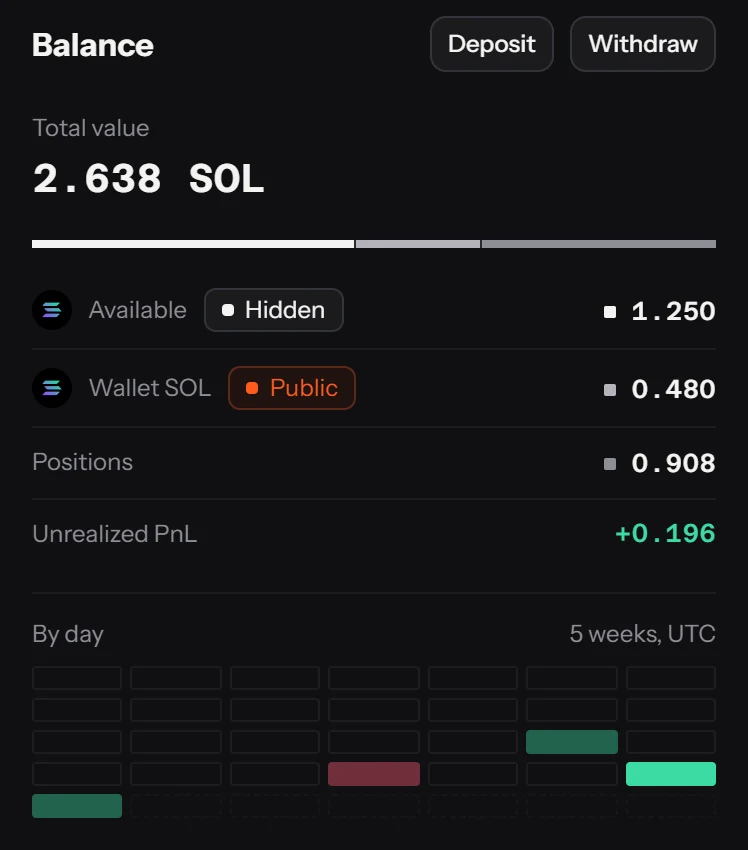
Your balance is the SOL the trade panel can spend. For your connected wallet it is its private balance in the pool. For a trading wallet it is the SOL at its own address plus its private balance. The SOL sitting in your connected wallet is outside Redact and is never part of your balance. Portfolio lists it apart as Wallet SOL.
The key in the top bar shows your balance. Until this tab knows it, the key asks you to unlock: one message in your wallet that cannot move funds. At zero it reads Deposit and opens the Deposit window. Otherwise it opens the Balance menu: the total value, your balance and the SOL in your wallet, then Deposit, Withdraw, Send and Receive.
A Deposit key funds the account the trade panel spends from. When you trade from trading wallets, it funds the first one ticked.
- Deposit
- SOL from your wallet into your balance. Pick an amount, or Max, which keeps back the network fee. Your wallet signs and pays the network fee.
- Wallet, amount
- Withdraw
- SOL from your balance to your wallet or any address you enter. Your wallet pays the fee and signs. Public: the destination, the amount and your wallet.
- Wallet, receiver, amount
- Send
- SOL or a coin from your balance to another person's Redact address. Paste the address: Redact checks the signature inside it and shows the wallet it belongs to before anything is sent. Public: both wallets and that a send happened. A send cannot be undone.
- Coin and amount
- Receive
- Shows your Redact address. Your wallet signs once to make it. It names your wallet and carries your signature. The coin and the amount someone sends you are encrypted on chain; their wallet and yours are not.
- Names your wallet
- Pay links
- Your address also comes as a link. Whoever opens it gets the Send form with your address filled in, and nothing else: no amount, no coin, no send. The address is checked exactly as a pasted one is, and lives only in the link.
- Unlock
- One message your wallet signs to show your balance in this tab. It cannot move funds.
- What it leaves in this browser is in What this browser keeps.
Trading
Pulse
Pulse streams new coins live in three lanes: New pairs, Final stretch and Migrated. Each lane has its own filters. Hovering a lane pauses it and counts what arrived meanwhile. Its Trending view ranks coins in four tables, Trending, Gainers, Volume and Graduated, over 5 minutes to 24 hours.
Filters cover age, market cap, liquidity, fees paid, bonding curve, transactions, buys, sells, holders, and the share held by the dev, the top 10, snipers, bundlers and insiders. You can also require socials, pick venues, show or hide coins by keyword, hide a deployer, and choose how Mayhem Mode and Proxima launches show.
The Clones key hides launches that copy another coin's ticker or name; the original and the strongest one stay. Rings Launch shows only coins launched on Rings Launch. Display switches between Dense and Roomy cards.
Quick buy
The quick buy key on a coin opens it and puts that amount in its trade panel, where your wallet confirms it. Each lane picks one of three amounts, P1, P2 and P3, which are 0.1, 0.5 and 1 SOL until you change them. Signed out, the key keeps the amount and opens sign-in; nothing is sent without a tap. A coin Redact cannot trade says why in one line.
From the keyboard: the arrow keys move over the coins on screen, B quick buys the one selected, Enter opens it and Escape clears the selection.
- Buy keys
- 0.1 · 0.5 · 1 · 5 SOL
- Sell keys
- 25 · 50 · 75 · 100%
- Slippage choices
- 1 · 5 · 10 · 20%
- Slippage to start
- 10%
- Review first
- Off until you turn it on
- Network
- Mainnet only
- Top 10
- Share held by the 10 largest wallets
- Dev
- Share the deployer still holds
- Snipers
- First buyers within about 4 seconds
- Bundlers
- Bought in a block with 3 or more buyers
- Insiders
- Wallets the dev funded
- LP burned
- Share of pool liquidity tokens burned
- Authority
- Mint and freeze revoked or active
- Trading a coin
- The panel has Buy and Sell tabs, four keys and an amount field. A key trades at once: the quote, the proof and the transaction run on one progress line, and your wallet confirms. With Review on, it stops at the quote so you can confirm it first. Review is remembered in this browser.
- Your position
- Under the panel: what went in, what came out, what you hold now and the result. A trade you made shows on the chart and in the trades table.
- Buying from your wallet
- When your balance cannot cover a buy, the panel can pay it from your wallet’s own SOL, marked From wallet. That buy is public: your wallet, the swap and its size. The coins are still held in the pool.
- Coins in your wallet
- A buy can leave a small amount of the coin in your wallet itself. The panel shows it as In wallet, with Add to balance to move it into the pool, which is a public deposit. When your wallet holds the coin, the Sell tab offers Include wallet, so one sell covers both.
Trading wallets
A trading wallet is a separate Solana address that trades for you with no wallet prompt per trade. Privy holds its key in its own isolated environment, with recovery and export. Redact never sees that key. Its trades are public under its own address, and what it buys is held in the pool.
Trading wallets are on for every signed-in wallet. A new account gets one called Main when it first signs in, and it is the one the trade panel uses.
Treat trading wallets as hot wallets: keep in them only what you trade with. A trading wallet can withdraw only to the wallet that set it up or to an address on a list that wallet signed. Network fees are paid from the SOL at its own address.
- Trading with
- One selector in the Pulse controls, the trade panel and the bottom bar shows what trades now: Connected, or the trading wallets you ticked. Ticks are saved with your account, so they match in every browser.
- The Wallets tab
- In Portfolio. Your connected account first, then each wallet with its balance. Create several at once with a name prefix and a group, rename, group, reorder and archive. A wallet that holds funds cannot be archived.
- Moving between them
- Drag wallets to Source and Destination, then Start transfer to move SOL between your trading wallets or back to your connected wallet, one wallet at a time. These moves are public on chain.
- Funding privately
- Private transfer funds trading wallets from an outside source through an exchange route, one order per wallet. No direct on-chain transfer then links them to your main wallet. A direct transfer does.
The Privacy page
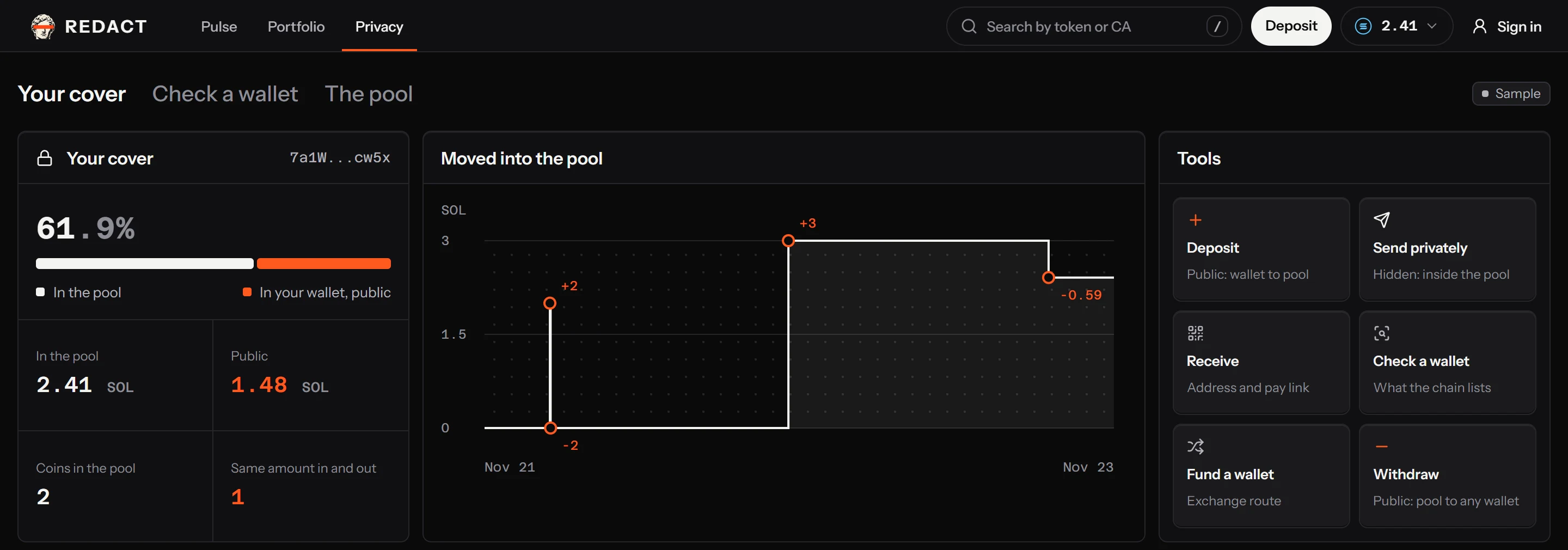
Privacy, at /exposed, has three views. It holds no positions and no buy or sell, and each tool opens a window that already exists elsewhere, so nothing on it sends on its own.
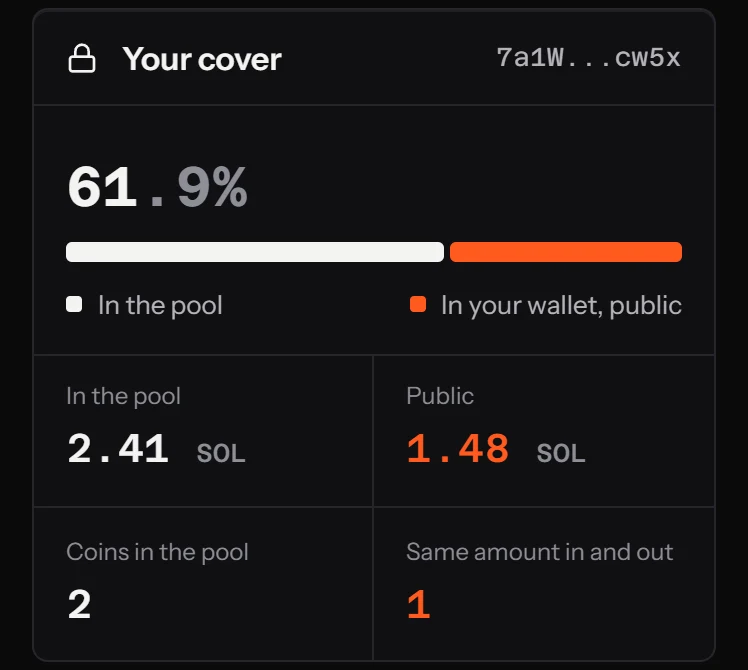
- Your cover
- How much of your SOL is in the pool and how much sits in your wallet in public, as one figure and a bar. Beside it: SOL in the pool, public SOL, coins in the pool, and how many withdrawals match an earlier deposit.
- Needs you to sign in and unlock.
- Check a wallet
- What the chain lists for any Solana address: its SOL, the coins it holds and what they are worth, and its recent trades as a copy bot reads them. Needs no account.
- The address goes to our server and to Helius to read the chain. The answer is kept in memory for 30 seconds and the address is written nowhere.
- The pool
- The pool’s totals, read through Helius and kept for a minute, and its SOL by day. The totals are public. Each holder’s balance in them is encrypted.
Tools
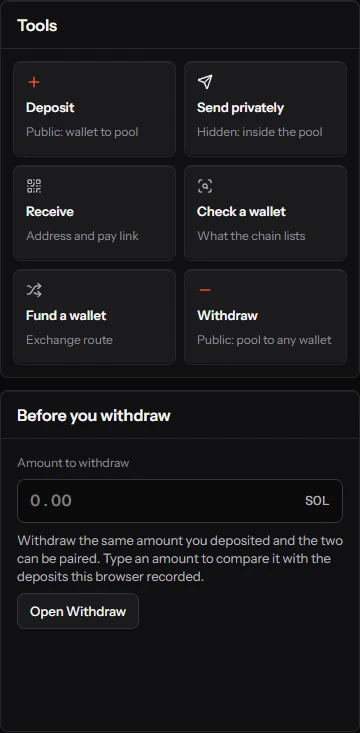
Six tools sit beside your cover. Deposit, wallet to pool, is public. Send privately keeps the coin and the amount hidden inside the pool. Receive shows your address and pay link. Check a wallet opens the second view. Fund a wallet leads to the Wallets tab and its exchange route. Withdraw, pool to any wallet, is public.
Before you withdraw
Withdraw the same amount you deposited and the two can be paired. Type an amount and the page compares it with the deposits this browser recorded. On a match it says which deposit, and offers an amount that matches none. Over your balance, it says so.
The lists and the chart
Moves lists the deposits and withdrawals made in this browser. Holdings lists what you hold in the pool beside the SOL in your wallet, and what others see of each. Matches lists withdrawals with the same amount as an earlier deposit. The chart draws what moved in and out over time.
Portfolio
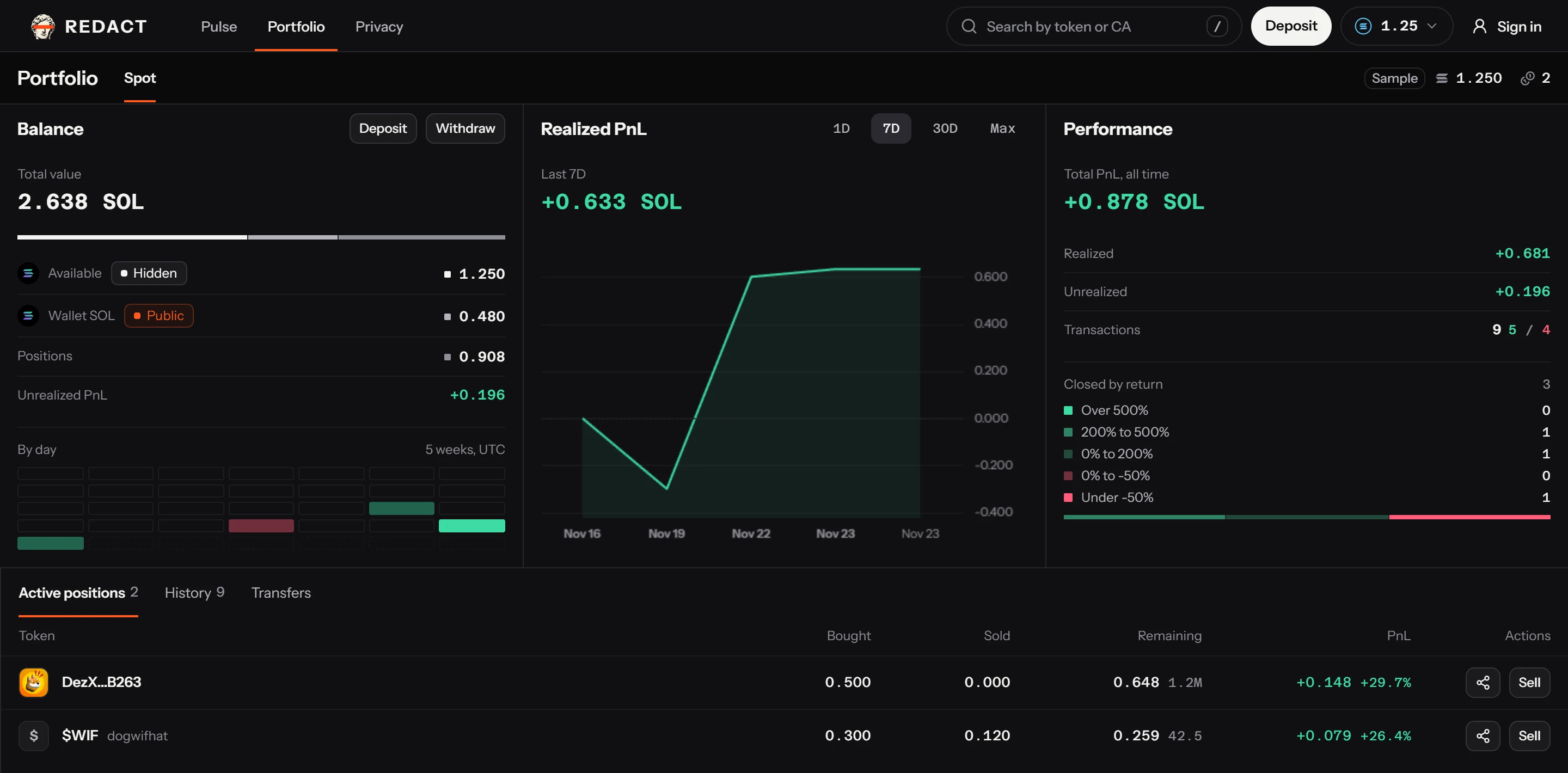
Portfolio opens on Spot. Its top row is Balance, PnL and Performance; under it one table switches between Active positions, History and Transfers. With trading wallets, a picker beside the tabs chooses whose figures count: all wallets, your connected account, or one trading wallet.
Coins with no price yet, or no recorded cost, are left out of the totals. Sells of coins bought before this browser kept a record have no known cost. Transfers lists the deposits and withdrawals made in this browser, so it never claims your whole history.
Signed out or locked, the frames stay with a dash where each figure goes, and the Balance panel carries Sign in or Unlock.
- Balance
- Available (your balance), Wallet SOL (the SOL in your connected wallet, kept apart) and Positions.
- PnL
- Realized PnL over 1D, 7D, 30D or Max, and a calendar by day.
- Performance
- Closed positions grouped by return.
- Wallets
- The trading wallets tab, shown to accounts that have trading wallets.
Fees
A pool trade carries one trading fee, paid out of the trade's own SOL inside the same transaction. If the trade fails, nothing is paid. The rates here are read from the same settings a trade reads, and they can change.
- The burn is set to 0.25% of each pool trade, the same for everyone. It runs once the Redact coin is live: it buys Redact and burns at least 80% of what it bought, inside your trade's own transaction, and no treasury holds it. Until then there is nothing to buy and burn, so trades carry no burn.
- The fee and the burn together can never be more than 5.00% of a trade. A fee too small to be worth a burn is skipped, and the trade says why.
- Trading Redact itself carries no fee. The network fee is separate.
The Fees page shows the same rates.
- SOL side of the trade
- 1 SOL
- Buys Redact to burn, 0.25%
- 0.0025 SOL
- Of what that buys, burned
- At least 80%
- Paid if the trade fails
- 0 SOL
- Before the coin is live
- No burn
The Redact token
The Redact token is not live yet. The bottom bar reads Redact at launch; once the coin is live it shows the price, and a click opens the coin's chart on this site. What the code does with the token is below, read from the same settings as Status and Fees.
| Status | Not live |
|---|---|
| Contract address | Nothing is shown before launch. The address, its copy key and the link to its page on Solscan appear here and in the account window once the server proves the coin on chain. |
| Burn per trade | 0.25% of each pool trade buys Redact and at least 80% of it is burned, once the coin is live. Before launch, trades carry no burn.The proof link appears here at launch. Before then the rate is this site's setting, with nothing on chain to show. |
| Holder tiers | None on this site: no part of the fee goes to Redact, so holding does not change the fee. Holding counts the Redact in your wallet plus your pool balance, read when the trade is quoted. This is this site's setting, with nothing on chain to link. |
| Fee on Redact itself | None. Trading the Redact coin carries no trading fee. |
Security and keys
Your funds in the pool are held by the Privacy Rings program, a program by Helius, not by Redact: the program on Solscan. Who can move what comes down to the keys below.
| Key | Who holds it | What it can do |
|---|---|---|
| Your wallet | You, in your wallet app. | Signs your sign-in, and every deposit, trade and withdrawal you make from your connected account. |
| Private balance keys | Made in this tab from a signature of your wallet. The signature is kept in this browser for 7 days. | Read your private balance and its history. They cannot move funds. |
| Trading wallet key | Privy, in its own isolated environment. Redact never sees it. | Signs that wallet's trades and moves with no prompt. |
| The spend secret | Sent inside the proof request, encrypted to the prover's enclave, through Redact's server. | Spends your notes in a trade or withdrawal. The server sees only ciphertext. |
- What the server can do
- Decide who may use the pool, on the server, from your sign-in session alone: nothing the browser sends can unlock it. Relay only the transaction shapes a trading wallet is allowed, such as a trade, a deposit, a withdrawal or a move between your own wallets, and check that a trade's fee goes to the server's own fee wallet. Pause trading. Redact and Helius can see which encrypted notes this browser asks about.
- What the server cannot do
- Sign for your wallet, or see the secret that spends your notes: it passes through encrypted. It cannot read a trading wallet key, which Privy holds.
- When trading is paused
- A trade or a deposit from a trading wallet is refused with "Trading is paused. You can still withdraw." Withdrawals keep working. If the server cannot read the switch, it treats trading as paused.
- The limit of those checks
- They bound what the server relays and catch honest mistakes. They are not a bound against a script running on this site, which could reach the trading wallets. That is why trading wallets are hot wallets: keep in them only what you can lose.
What this browser keeps
Balance reads go through Redact’s server to the Helius indexer, so Redact and Helius can see which encrypted notes this browser asks about.
Your private keys are derived in this tab. The wallet signature they come from, and your last pool balances, are kept in this browser for 7 days, so a reload shows them without asking your wallet again. It cannot move funds, but anyone who copies it from this browser can read your private balance and its history, so sign out or disconnect the wallet on a computer you share: both remove it. Locking the wallet does not.
A withdrawal or a trade does send the secret that spends your notes: it goes inside the proof request, encrypted to the prover’s enclave, through Redact’s server, which sees only ciphertext.
The unlock message you sign names anontrade.app, this product’s original address, and it is the same message on every address of this product. Your wallet should show the address in your address bar as the site asking. The keys are specific to Redact. A private balance made here will not show up in another Privacy Rings app, and one made elsewhere will not show here.
| What | Notes |
|---|---|
| The unlock signature and your last pool balances | 7 days. Signing out or disconnecting the wallet removes it. Locking the wallet does not. |
| Your deposits and withdrawals | Recorded from the first move made in this browser. Privacy and Portfolio's Transfers read it. |
| Pulse settings | Filters, quick buy amounts, each lane's P1 to P3, display, clones, hidden and saved coins. |
| Trade panel settings | Buy and sell keys and the Review choice. |
The unlock message names anontrade.app, this product's original address. It is the same message on every address of Redact, because changing it would change every user's keys.
Status
Every signed-in wallet can trade, with real SOL routed through Jupiter. Every trade from Pulse or a coin page runs through the pool with real SOL.
| Part | Now | What it means |
|---|---|---|
| Who can trade | Open | Any signed-in wallet can use the pool, except one whose request was declined. |
| Trading wallets | On | Every signed-in wallet the pool lets in can create and fund them. |
| The burn | 0.25% | Set for each pool trade. It runs once the Redact coin is live; before launch, trades carry no burn. |
| Fee to Redact | Off | No part of the fee goes to Redact. |
| Buys from wallet SOL | On | A buy your balance cannot cover can be paid from your wallet’s own SOL, in public. |
| Size limit | None | The server sets no size limit on a trading wallet’s trade. |
These defaults hold when nothing is set: invite only, trading wallets off, a burn of 0.25%, no fee to Redact until its fee wallet is set, buys from wallet SOL on, and no size limit.
Questions and links
- Can people see my trades?
- Yes. The wallet that signs, the swap and its size are public. What the pool hides is what you hold.
- Can someone look up what I hold?
- A lookup of your wallet does not list coins held in the pool. Your deposits, trades and withdrawals can still be read from the chain.
- Does Redact hold my keys?
- No. Your wallet's key stays in your wallet. A trading wallet's key is held by Privy, not by Redact.
- Can I withdraw when trading is paused?
- Yes. A pause stops trades and deposits from trading wallets. Withdrawals keep working.
- Why does the unlock message name anontrade.app?
- It is this product's original address. The message never changes, because changing it would change every user's keys.
- Will my balance show in another Privacy Rings app?
- No. The keys are specific to Redact. A balance made here will not show up in another Privacy Rings app.
- Is Redact part of Helius?
- No. Privacy Rings is a program by Helius. Redact is not affiliated with Helius.
- Where is the contract address?
- The token is not live yet. The address appears in The Redact token and in the account window once the coin is on chain.